Review Files
This page provides oversight and to see if the data provided is entirely in the system. Key things to confirm are the number of rows, that all rows are linked to filings, and that the pivoted amounts are in line with expectations.
The aggregated data is only based on data uploaded to this Wizard and won’t show you any data uploaded to a prior wizard.
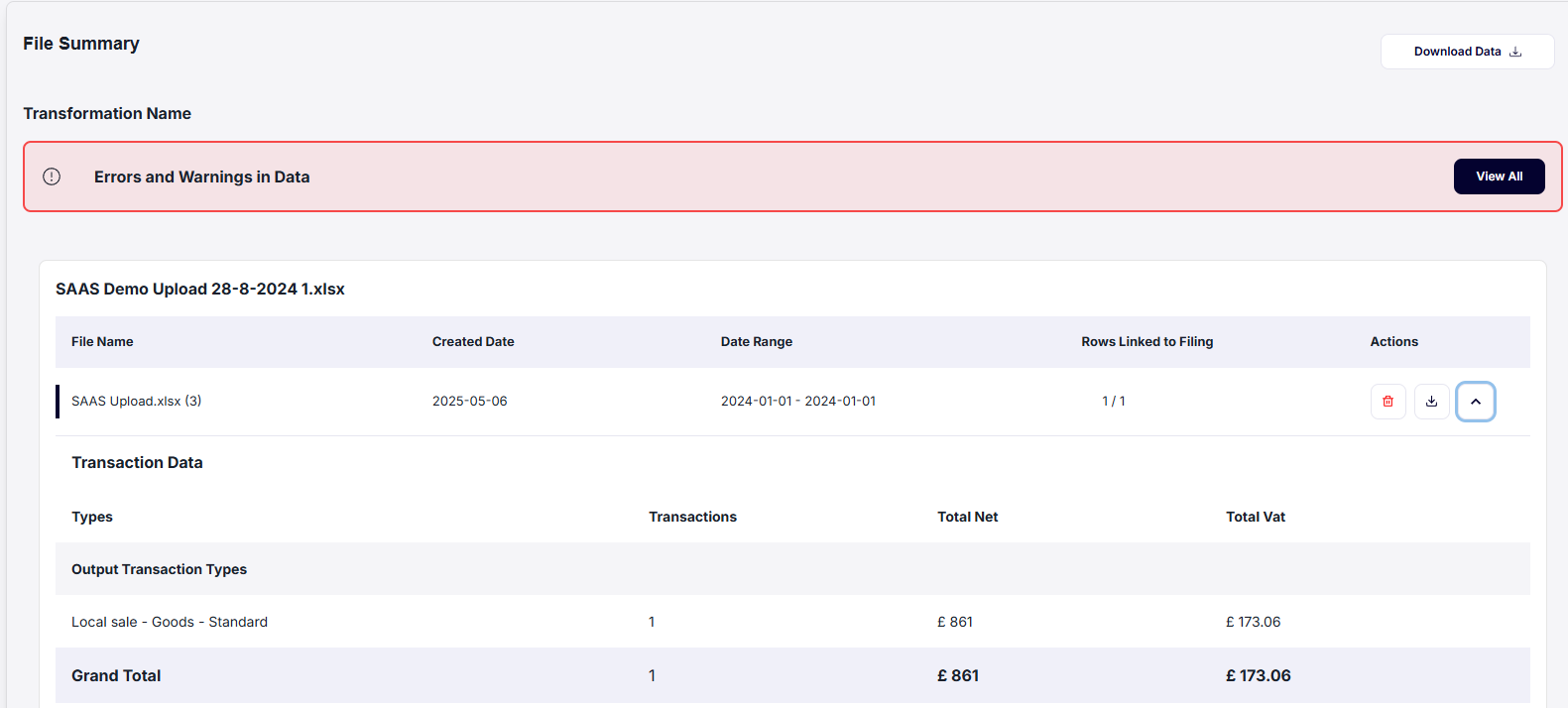
1. Download data
Users can download all data uploaded into the wizard or select specific sheets they want to download. This report will be sent via email to the user.
This is useful if the data is not in line with your expectations and needs to be investigated why the data is different.
2. Delete Data
Users can delete sheets if the transactions are not linked to a filed filing. If transactions are linked to a filing, they cannot be deleted.
This is useful if the data is not in line with your expectations and needs to be removed from the wizard.
FAQ: How do I delete transactions that are not linked to a filed filing?
Users are able to use the bulk actions from the taxLedger or the Resolve Errors & Warnings tab.
3. Errors and warnings
Finally, the summary page will alert you if you have any errors or warnings to fix. These will be resolved in the next steps.
Clicking on View All will take you to the Date Overview Page.
4. Proceed
If everything is correct on this page, click the Next button in the bottom right corner to proceed.
FAQ: What if not all rows are linked to a filing?
This indicates that some transactions are not associated with any filing. This can be fixed on the Date Overview page.