Introduction
Overview
The transaction wizard streamlines the ingestion, review, error resolution, and submission of transactional data and ensures the client's data is valid, accurate, and complete. The upload wizard can be thought of as a container for transactions to ensure only clean data is submitted to the tax Ledger, with transactions being contained within the wizard until they are committed to the taxLedger and linked to filings.
The wizard can be accessed through 3 locations:
- My Compliance Page -> Upload data button
- Filing Page -> Upload data button
- Transactions Page -> Transaction wizard button
It is important to note that only 1 active wizard is possible per an entity jurisdiction. A wizard must be completed or deleted prior to a new wizard being used. You will be blocked from having multiple wizards open.
The status of the wizard will be determined based on the status of the underlying transactions.
Statuses of the wizard:
| # | Status of wizard | Explanation |
|---|---|---|
| 1. | Pipeline failed | The pipeline has failed. This is a system error, and you should try re-uploading the data. |
| 2. | Transformation no data to process | There is no data in the system that is being processed. |
| 3. | Headers do not match | There is an error with the column headers in the flat file uploaded. |
| 4. | Transformation Contains errors | The transformation has errors that need to be resolved. |
| 5. | Transformation failed | The transformation failed to process. Please retry. |
| 6. | Pipeline pending | The pipeline is pending. |
| 7. | Pipeline in progress | The pipeline is in progress. |
| 8. | Pending commit | The transactions are still in the wizard and are ready to be committed to the ledger. |
| 9. | Sheets have issues | The uploaded sheets have issues that need to be resolved before being able to commit to the ledger. |
| 10. | Incomplete data | The data in the wizard is not complete and needs to be completed before being able to commit transactions. |
| 11. | Contains unlinked transactions | The transactions are not linked to a filing and need to be linked before being able to commit transactions. |
| 12. | Contains errors and/or warnings | The transactions contain errors and warnings and need resolution before being able to commit transactions. |
| 13. | Files have issues | "Files have issues" is a status that groups all sheet errors. |
An in-progress wizard will stop any filings impacted by the wizard from moving forward through the state flow.
Multiple completed wizards can link to one filing, so if you need to include more data in a completed wizard, start a new wizard.
Within the wizard, it will guide the user through each step, only allowing the user to proceed to the next step when the relevant errors and warnings have been resolved. As a user proceeds through the wizard, the status of the wizard updates to reflect the step the wizard is on.
Steps within the wizard:
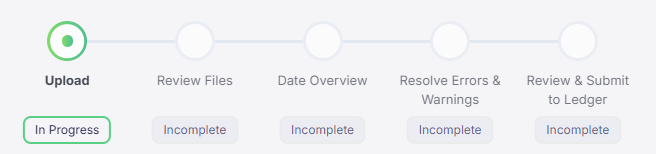
| # | Step | Explanation |
|---|---|---|
| 1. | Upload | Users upload their data, and transactions are evaluated for validity. |
| 2. | Review Files | Users can review the sheets uploaded, ensuring that the transactions are in line with their expectations. |
| 3. | Date Overview | Users will use this page to ensure that all transactions are linked to a filing. |
| 4. | Resolve Errors & Warnings | Users will resolve errors and warnings by editing the data using bulk actions or individual lines. |
| 5. | Review and Submit to Ledger | This page shows the expected impact on filings before committing the transactions. It also allows a user to commit the transactions to the ledger. |